
상추의 IT저장소
Open API (OpenweatherAPI) 이용하여 날씨정보 구현하기 본문
1. API의 개념
API - application programming interface의 약자로 API는 응용 프로그램이 운영체제나 데이터베이스 관리 시스템과 같은 시스템 프로그램과 통신할 때 사용되는 언어나 메시지 형식을 가지며, API는 프로그램 내에서 실행을 위해 특정 서브루틴에 연결을 제공하는 함수를 호출하는 것으로 구현된다.
[네이버 지식백과] API [application programming interface] (두산백과 두피디아, 두산백과)
2. project에 API 활용하기
https://openweathermap.org/ 사이트에서
openweatherapi를 활용하여 날씨정보를 WEB페이지에 구현해보았다.
사용방법은
1. 해당 사이트에 가입하여 APIkey키를 발급 받는다.
2. api를 호출한다
3. 호출된 자료는 JSON 데이터로 받아 볼 수 있는데 해당 자료를 console.log로 확인을 한 후에 객체형식으로 되어있는 자료를 변수에 담아준다.
4. 해당변수를 화면에 보여주기 위해 JQuery를 활용하여 화면단에 보여주었다.
<!DOCTYPE html>
<html lang="en">
<head>
    <meta charset="UTF-8">
    <meta http-equiv="X-UA-Compatible" content="IE=edge">
    <meta name="viewport" content="width=device-width, initial-scale=1.0">
    <title>Weather</title>
</head>

<script src="http://code.jquery.com/jquery-latest.js"></script>
<script>
const getJSON = function(url, callback) {
    const xhr = new XMLHttpRequest();
    xhr.open('GET', url, true);
    xhr.responseType = "json";
    xhr.onload = function() {
        const status = xhr.status;
        if (status === 200) {
            callback(null, xhr.response);
        }else {
            callback(status, xhr.response);
        }
    };
    xhr.send();
}
</script>
<script>
    /*
    $.getJSON('파일경로', function(data){
        //가져온 data로 할일!!
    });
    */
    $.getJSON(`http://api.openweathermap.org/data/2.5/forecast?id=<< APIKEY >>`,
    function(data){
        //alert(data.list[0].main.temp_min);
        var $Temp = data.list[0].main.temp;
        var $maxTemp = data.list[0].main.temp_max;
        var $minTemp = data.list[0].main.temp_min;
        //A.appendTo(B) B요소의 내용의 뒤에 A를 추가
        //A.append(B) A요소의 내용의 뒤에 B를 추가
        //A.prependTo(B) B요소의 내용의 앞에 A를 추가
        //A.prepend(B) A요소의 내용의 앞에 B를 추가
        $('.ctemp').append($minTemp);
        $('.clowtemp').append($minTemp);
        $('.chightemp').append($maxTemp);

    });

</script>
<body>
    <h1>weather api</h1>
    <div class="ctemp">현재온도:</div>
    <div class="clowtemp">최저온도:</div>
    <div class="chightemp">최고온도:</div>

</body>
</html>
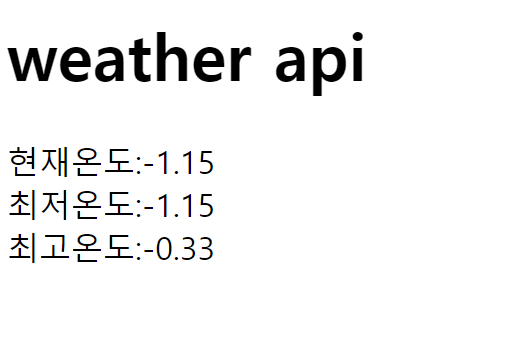
- 구현화면
'Project' 카테고리의 다른 글
| 두번째 team 프로젝트 회고록 (0) | 2022.11.04 |
|---|---|
| 첫 team 프로젝트 회고록 (0) | 2022.11.04 |
'Project' Related Articles
more

